Glance at the Windows 7 calculator and you may think that it’s much the same as the calculator in earlier versions of Windows. But you’d be wrong. Look under the hood and you’ll find that Microsoft have made the calculator much more useful
To find the calculator in Windows 7, either go to Start > All Programs > Accessories > Calculator, or simply click the Start button, type calc and hit Enter.
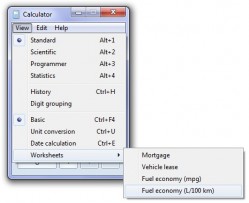
Once it’s open, click the View button and you’ll see a host of options including Scientific, Programmer, Unit Conversions and Worksheets. Students will find some of the options to be especially useful, while parents may find that some of those very same options bring back unpleasant memories of math class (sines and cosines and tangents, oh my!).
But it’s not all schooldays math: there are some options which everybody will find useful too. For example, the unit conversion option enables you to, surprise, surprise, convert between units of distance, weight, pressure, etc. The Worksheets are particularly useful and enable you to, for example, calculate mortgage repayments or even the residual value of a leased car.
Think the Windows 7 calculator is something you’ll find yourself or your kids using now that you know it offers more features than just your basic calculator? What hidden or not-so-obvious features of Windows 7 have you discovered?