Category Archives: Server 2019

All Users Desktop Folder in Windows Server 2016/2019

If you want to copy some shortcuts or files to all users desktop in server 2016/2019. specially if your configuring a remote desktop session host server and you want to copy company applications short cuts to all users desktop.like in previous versions c:\users\all users\desktop is not available on these server editions.

in Server 2019 and 2016 its available in
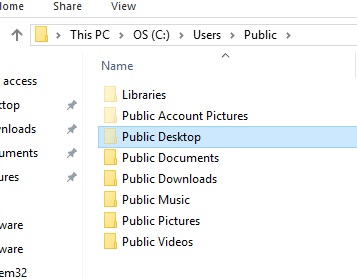
C:\Users\Public\Desktop


If you cannot see the desktop Folder tick show hidden items from windows explorer ribbon 

Also

To find out the directory for your system run Following command in a PowerShell prompt:

[Environment]::GetFolderPath('CommonDesktopDirectory')

Server 2019 Black Screen on RDP with Domain Administrator account

I had this problem today morning with a newly installed 2019 server. it was working find until connect to domain.after joined to domain i cannot login to server with domain administrator account via RDP i just get a blank black screen.only task manager was working. after researching trying many ways this is how i manage fixed the problem

Change following setting in local GPO:

Computer Configuration->Windows Settings->Security Settings->Local Policies->Security Options

Enable “User Account Control: Admin Approval Mode for the Built-in Administrator account” which is set to “Not Defined”

After that do a gpupdate /force and try to login as domain administrator again